Week 5 · Synchronous design and verification · Lesson 10 of 24
cocotb tutorial: Python testbenches for FPGA designs
Verify Verilog and SystemVerilog designs from Python with cocotb 2.x: clocks, triggers, NumPy reference models, scoreboards and pytest with Icarus Verilog.
What you will learn
- Write cocotb test coroutines that start a clock, apply reset, drive inputs and check outputs
- Choose the right trigger (Timer, RisingEdge, FallingEdge, ClockCycles, ReadOnly) for each step of a test
- Verify a pipelined datapath against a NumPy reference model with a driver, a monitor and a scoreboard
- Build and run cocotb tests from pytest with the cocotb_tools.runner API and Icarus Verilog
- Decide when a Python testbench or a SystemVerilog testbench is the better tool
Before you start
- Self-checking testbenches in SystemVerilog (lesson 9)
- Finite state machines (lesson 8)
- Basic Python: functions, classes, lists and asyncio-style async/await syntax
After this lesson you can write a testbench in Python with cocotb, run it on Icarus Verilog from pytest, and check a pipelined datapath against a NumPy model on every cycle. The hardware stays in SystemVerilog. Only the test moves to Python.
Why write the testbench in Python
The course has one rule for every lab: no bitstream until the testbench passes. You hand in the simulation log together with the board demo. A bug found in simulation costs a rerun of a few seconds. The same bug found on the board costs a synthesis and place-and-route run, and then a debug session with a logic analyser.
Lesson 9 built self-checking testbenches in SystemVerilog. cocotb keeps the same structure (clock, reset, stimulus, reference model, checker) but writes it in Python. That brings three practical gains:
- Reference models can use NumPy and SciPy. A filter, an FFT or a CRC that already exists in Python becomes the golden model without a rewrite.
- Tests are ordinary Python files. pytest collects them, runs them in a script or a CI job, and reports pass or fail like any other unit test.
- The same Python test can drive a Verilog or a VHDL design, and run on several simulators.
The cost is speed. Every signal read or write crosses from Python into the simulator. On the machine used for this lesson (Icarus Verilog 13.0), 200 000 checked cycles of the 8-bit accumulator took 0.4 s as a SystemVerilog testbench and 3.7 s as a cocotb test. That is fine for unit tests of blocks. For long system-level runs, keep more of the testbench in HDL.
How cocotb works
cocotb loads into the simulator as a library. With Icarus, the runner starts vvp with -m libcocotbvpi_icarus.so, and that library talks to the simulator through the Verilog Procedural Interface (VPI), the C interface defined in IEEE 1800. cocotb then imports your Python test module and runs the test functions.
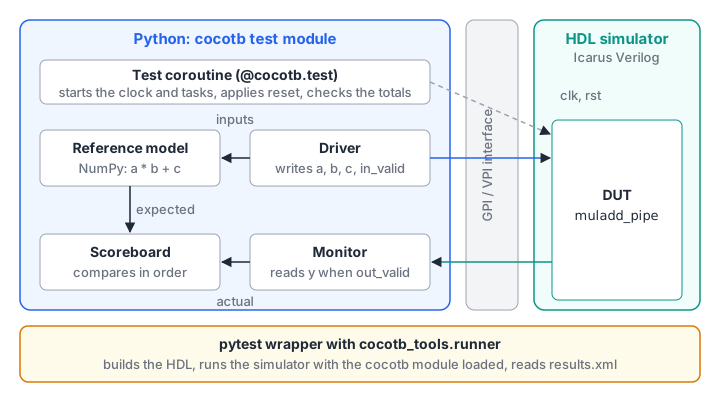
A cocotb test is an async function decorated with @cocotb.test(). It receives dut, a handle to the top-level module, and reaches every port and internal signal as an attribute: dut.clk, dut.acc, dut.u_core.state.
The test runs as a coroutine. Simulation time only advances while Python is waiting. Each await hands control back to the simulator until a trigger fires: a time delay, a clock edge, or a phase of the current time step. Code between two await statements runs in zero simulation time.
cocotb.start_soon(coro) starts another coroutine as a concurrent task. A test usually starts a clock this way, plus a driver and a monitor that run alongside the main test body.
Triggers you will use
| Trigger | Fires when | Typical use |
|---|---|---|
Timer(20, unit="ns") | 20 ns of simulation time have passed | Asynchronous inputs, delays without a clock |
RisingEdge(dut.clk) | clk changes to 1 | Step a driver or monitor once per cycle |
FallingEdge(dut.clk) | clk changes to 0 | Change inputs half a cycle away from the active edge |
ClockCycles(dut.clk, 3) | 3 rising edges have passed | Hold reset, wait for a pipeline to drain |
ReadOnly() | The current time step has no more events | Sample outputs once every process has settled |
All of them are imported from cocotb.triggers. Clock comes from cocotb.clock.
Reading and writing signals
You write a signal by assigning to its value attribute and read it from the same attribute:
dut.din.value = 200                # write
acc = int(dut.acc.value)           # read as an unsigned integer
y = dut.y.value.to_signed()        # read as two's complement
Reading a vector returns a LogicArray, which can hold 0, 1, X, Z and the other logic values (a 1-bit signal returns a single Logic). int() and to_unsigned() give the unsigned value, and to_signed() gives the two’s complement value. By default, if any bit is X or Z, the conversion raises ValueError, so an unknown output makes the test fail instead of slipping through a comparison. Compare that with the != trap in lesson 9.
For an n-bit port, cocotb with Icarus accepted integers from to in a quick test, and raised ValueError for anything outside that range. Writing -1 to an 8-bit port stores 11111111.
A write does not change the signal immediately. cocotb queues it and applies it in the read-write synchronisation phase of the current time step. By then, the processes triggered by a clock edge have already sampled their inputs, so a value written just after RisingEdge is captured by the flip-flops on the next rising edge. That makes “wait for the edge, then write the next input” a race-free way to drive a synchronous design.
Setting up
You need Python 3 with cocotb 2.x, pytest and NumPy, plus Icarus Verilog on the PATH. The examples were run with Python 3.12, cocotb 2.1.0, pytest 9.2.0, NumPy 2.5.5 and Icarus Verilog 13.0. Install cocotb into a virtual environment or conda environment for your project, not into the system Python.
Download the files for this lesson into one folder:
Downloadaccum8.sv
Download muladd_pipe.sv
Download models.py
Download test_models.py
Download sim_runner.py
Download cocotb_accum8.py
Download test_cocotb_accum8.py
Download cocotb_muladd.py
Download test_cocotb_muladd.py
The naming convention matters. Files called cocotb_*.py hold the cocotb tests, which only run inside a simulator. Files called test_*.py are what pytest collects: the plain model tests and the wrappers that launch the simulator.
A first test: the 8-bit accumulator
The DUT is accum8 from lesson 9, unchanged. On each rising edge it clears on rst or clr, adds din to acc when en is high, and reports the carry-out of the last addition.
The reference model is a small Python class in models.py. It knows nothing about cocotb, so test_models.py can test it on its own:
@dataclass
class Accum8Model:
    acc: int = 0
    carry: int = 0

    def step(self, rst: int, clr: int, en: int, din: int) -> None:
        if rst or clr:
            self.acc, self.carry = 0, 0
        elif en:
            total = self.acc + din
            self.acc, self.carry = total & 0xFF, total >> 8
The test module has two helpers. start launches a 100 MHz clock and holds reset for two cycles. cycle applies one set of inputs for one clock cycle and checks the result:
async def start(dut) -> Accum8Model:
    cocotb.start_soon(Clock(dut.clk, 10, unit="ns").start())
    dut.rst.value = 1
    dut.clr.value = 0
    dut.en.value = 0
    dut.din.value = 0
    await ClockCycles(dut.clk, 2)
    return Accum8Model()


async def cycle(dut, model: Accum8Model, rst: int = 0, clr: int = 0,
                en: int = 0, din: int = 0) -> None:
    await FallingEdge(dut.clk)
    dut.rst.value = rst
    dut.clr.value = clr
    dut.en.value = en
    dut.din.value = din
    await RisingEdge(dut.clk)              # the DUT samples the inputs here
    model.step(rst, clr, en, din)
    await ReadOnly()                       # wait until all signals are stable
    got = (int(dut.acc.value), int(dut.carry.value))
    assert got == (model.acc, model.carry), (
        f"inputs rst={rst} clr={clr} en={en} din={din}: "
        f"DUT (acc, carry) = {got}, model = {(model.acc, model.carry)}")
Inputs change on the falling edge, as in lesson 9. After the rising edge the model takes the same step as the DUT, and after ReadOnly the outputs are compared. A failing assert ends the test and prints the message, so put the inputs into it: the log then tells you what went wrong without opening a waveform.
Note the order. ReadOnly comes after RisingEdge and before the next FallingEdge. A write during the read-only phase raises a RuntimeError, so the next write has to wait for a later trigger.
Directed tests
A directed test checks the cases you know are risky:
@cocotb.test()
async def directed(dut) -> None:
    model = await start(dut)
    await cycle(dut, model, rst=1)
    await cycle(dut, model, en=1, din=200)
    await cycle(dut, model, en=1, din=100)         # 300 wraps to 44, carry 1
    await cycle(dut, model, en=0, din=77)          # hold
    await cycle(dut, model, en=1, din=0)           # carry clears on next add
    await cycle(dut, model, clr=1, en=1, din=5)    # clr beats en
    await cycle(dut, model, en=1, din=255)
    await cycle(dut, model, en=1, din=1)           # exactly 256: acc 0, carry 1
    await cycle(dut, model, rst=1, en=1, din=9)    # reset beats everything
Random tests and seeds
Random stimulus finds the cases you did not think of. cocotb seeds Python’s random module at start-up from the environment variable COCOTB_RANDOM_SEED. If the variable is not set, cocotb picks a seed and prints it on the first lines of the log (“Seeding Python random module with …”). Before each test, cocotb reseeds random with a value computed from that seed and the test name, so each test gets its own repeatable sequence. Rerun with the same seed and the test repeats exactly.
@cocotb.test()
async def random_stimulus(dut) -> None:
    model = await start(dut)
    await cycle(dut, model, rst=1)
    for _ in range(2000):
        await cycle(dut, model,
                    rst=int(random.random() < 0.01),
                    clr=int(random.random() < 0.05),
                    en=int(random.random() < 0.7),
                    din=random.randrange(256))
The probabilities shape the traffic. With en high 70 % of the time, the accumulator wraps often, so the carry logic is exercised hundreds of times. A rare clr and an even rarer rst test the clear paths without hiding everything else.
For NumPy, create a generator from cocotb.RANDOM_SEED, which inside a test holds that per-test seed: np.random.default_rng(cocotb.RANDOM_SEED).
Running tests from pytest
cocotb 2.x includes a Python runner in cocotb_tools.runner. It builds the HDL and runs the simulator with the cocotb library loaded. The cocotb documentation describes it as a replacement for the older Makefile flow, and still marks the runner API as experimental, so check the release notes when you upgrade.
sim_runner.py wraps the runner in one function that every pytest wrapper calls:
def run_cocotb(sources: list[str], toplevel: str, test_module: str,
               parameters: dict[str, object] | None = None,
               seed: int = 12345) -> tuple[int, int]:
    if str(HERE) not in sys.path:
        sys.path.insert(0, str(HERE))          # the runner exports sys.path as PYTHONPATH
    runner = get_runner("icarus")
    with tempfile.TemporaryDirectory() as tmp:
        build_dir = Path(tmp)
        runner.build(
            sources=[HERE / s for s in sources],
            hdl_toplevel=toplevel,
            parameters=parameters or {},
            build_dir=build_dir,
            timescale=("1ns", "1ps"),          # Icarus needs a time precision finer than 1 s
        )
        results = runner.test(
            test_module=test_module,
            hdl_toplevel=toplevel,
            build_dir=build_dir,
            test_dir=build_dir,
            results_xml=str(build_dir / "results.xml"),
            seed=seed,
        )
        return get_results(results)
Three details are worth copying:
- The timescale. Without a
`timescalein the source or thetimescaleargument, Icarus simulates with a precision of 1 s.Clock(dut.clk, 10, unit="ns")then fails with “Unable to accurately represent 10(ns) with the simulator precision of 1e0”.accum8.svcarries its own`timescale, but setting it in the runner makes every design safe. - The build directory. Building in a temporary directory keeps compiled simulation files and the results file out of your source folder.
- The results file.
runner.testwrites a JUnit-styleresults.xml.get_resultsfromcocotb_tools.check_resultsreturns the number of tests and the number of failures and errors. Under pytest, the runner also stops with an error when a cocotb test fails, so a failure is never silent.
Each wrapper is then four lines:
from sim_runner import run_cocotb


def test_accum8() -> None:
    n_tests, n_failed = run_cocotb(["accum8.sv"], toplevel="accum8", test_module="cocotb_accum8")
    assert n_tests > 0 and n_failed == 0, f"{n_failed} of {n_tests} cocotb tests failed"
Run everything from the download folder:
python -m pytest -q
# .....                                                    [100%]
# 5 passed
With the three exercise files from the end of the lesson in the same folder, the count is 6.
Use pytest -s to see the cocotb log, which ends with a table of every test, its result and its simulation time. The n_tests > 0 check catches a wrapper that loaded the wrong module and ran nothing.
Datapath and control: a pipelined multiply-add
Blocks in a real design have a datapath (the arithmetic) and control (valid flags, enables, state). The second example computes in three register stages, the same pattern as the MAC in memory and DSP:
// Datapath (no reset)
always_ff @(posedge clk) begin
    a_r  <= a;                                   // stage 1
    b_r  <= b;
    c_r  <= c;
    p_r  <= a_r * b_r;                           // stage 2
    c_rr <= c_r;
    y    <= (2*W+1)'(p_r) + (2*W+1)'(c_rr);      // stage 3, sign-extended
end

// Control: valid pipeline (reset)
always_ff @(posedge clk) begin
    if (rst) begin
        v1        <= 1'b0;
        v2        <= 1'b0;
        out_valid <= 1'b0;
    end else begin
        v1        <= in_valid;
        v2        <= v1;
        out_valid <= v2;
    end
end
With W = 16, a and b are 16-bit signed, c is 32-bit signed and y is 33 bits. The largest magnitude is , which needs 33 bits as a signed number. test_models.py checks that bound with the NumPy model.
The reference model is one line of NumPy, computed in 64-bit integers so it cannot overflow:
def muladd_ref(a: np.ndarray, b: np.ndarray, c: np.ndarray) -> np.ndarray:
    return a.astype(np.int64) * b.astype(np.int64) + c.astype(np.int64)
Driver, monitor and scoreboard
For a pipelined block, a cycle-by-cycle check like the accumulator test gets awkward. The usual structure splits the testbench into independent parts:
- The driver presents inputs. It also pushes the expected result into the scoreboard, together with the cycle number.
- The monitor watches the outputs and passes every valid result to the scoreboard.
- The scoreboard compares results in order and checks that each one arrived exactly
LATENCYcycles after its inputs.
async def monitor(dut, sb: Scoreboard) -> None:
    cycle = 0
    while True:
        await RisingEdge(dut.clk)
        cycle += 1
        await ReadOnly()
        if dut.out_valid.value == 1:
            sb.check(dut.y.value.to_signed(), cycle)


async def drive(dut, sb, a, b, c, idle_prob, rng) -> None:
    expected = muladd_ref(a, b, c)
    cycle = 0
    i = 0
    while i < len(a):
        await RisingEdge(dut.clk)
        cycle += 1
        if rng.random() < idle_prob:
            dut.in_valid.value = 0
            continue
        dut.in_valid.value = 1
        dut.a.value = int(a[i])
        dut.b.value = int(b[i])
        dut.c.value = int(c[i])
        sb.add_expected(int(expected[i]), cycle)   # presented in this cycle
        i += 1
    await RisingEdge(dut.clk)
    dut.in_valid.value = 0
The driver writes right after each rising edge, which is safe for the reason given earlier. Both tasks count edges the same way, so the difference in cycle numbers is the latency. The int(...) conversions matter: assigning a NumPy int64 to a signal raises a TypeError. The driver also inserts random idle cycles, which tests that out_valid tracks in_valid and not just a free-running counter.
The scoreboard is a deque of expected values. check pops the oldest entry, compares it, and records an error instead of stopping at once, so one run can report several mismatches. The test asserts at the end that there were no errors, that nothing is left in the deque, and that the number of checked results equals the number sent.
Directed and random tests
corner_cases sends the extreme values back to back: , , mixed signs, and the largest and smallest c. random_samples sends 5000 random triples, and @cocotb.parametrize runs it twice, once with no idle cycles and once with 30 % idle cycles:
@cocotb.test(timeout_time=200, timeout_unit="us")
@cocotb.parametrize(idle_prob=[0.0, 0.3])
async def random_samples(dut, idle_prob: float) -> None:
    rng = np.random.default_rng(cocotb.RANDOM_SEED)
    n = 5000
    a = rng.integers(-(2**15), 2**15, n)
    b = rng.integers(-(2**15), 2**15, n)
    c = rng.integers(-(2**31), 2**31, n)
    sb = await run(dut, a, b, c, idle_prob, seed=cocotb.RANDOM_SEED + 1)
timeout_time fails the test if it runs longer than 200 µs of simulation time. Without it, a test that loops until out_valid goes high would wait forever if the DUT never raised it. The two random runs finish at about 50 µs and 72 µs.
All three tests pass, with 10 009 results checked in total. To see that the tests have teeth, change one line of the RTL so that b_r is declared without signed. The multiplication then becomes unsigned, and corner_cases fails on its second sample:
AssertionError: cycle 5: got 65535, expected -1came out as . A test with only positive random numbers would not catch this, which is why the corner cases are worth writing by hand.
cocotb or a SystemVerilog testbench
Both approaches build the same pieces. The choice depends on what the test needs.
| Question | SystemVerilog testbench (lesson 9) | cocotb |
|---|---|---|
| Reference model | Written in SystemVerilog | Any Python code, including NumPy and SciPy |
| Run speed | Runs inside the simulator | Slower: every signal access crosses VPI (0.4 s vs 3.7 s in the measurement above) |
| Concurrency | fork, always, initial | cocotb.start_soon tasks and await |
| Test runner | Shell scripts, $fatal exit codes | pytest, JUnit XML results |
| Assertions on signal timing | SVA properties, where the simulator supports them | Written as Python checks in a monitor |
| Language of the DUT | Verilog and SystemVerilog; VHDL needs a mixed-language simulator | Verilog or VHDL, on any simulator cocotb supports |
The cocotb runner in version 2.1.0 has back ends for Icarus Verilog, Verilator, GHDL, NVC, Questa, Xcelium, VCS, DSim and Aldec simulators. One practical pattern uses both languages: SVA properties inside the RTL or a bind file, for protocol rules that must hold on every cycle, and cocotb for stimulus, reference models and scoreboards.
The workflow: no bitstream until the testbench passes
Put the rule into the way you work:
- Write the reference model first, in plain Python, with its own
test_*.py. It is easier to get right without a simulator in the loop. - Write the RTL and a cocotb test with directed cases for the edges you can name: reset, overflow, back-to-back inputs, idle cycles.
- Add a seeded random test and run it until the coverage you care about appears in the log (for example, the number of carries or matches seen).
- Run
python -m pytest -qbefore every synthesis run. A Git pre-commit hook or a CI job can do this for you. - Keep the passing log. In this course it is handed in with the board demo.
The next lessons build on this. Timing analysis checks the same designs for speed, and the DSP lessons use NumPy reference models in exactly this way.
Lab: verify the 1011 sequence detector with cocotb
Write a cocotb test for seq_detect_moore from finite state machines. The detector raises detect for one cycle after the last four bits received were 1, 0, 1, 1, and overlapping matches count. Build a Python reference model, send directed patterns that include an overlapping match, then 2000 random bits. Check detect after every edge and run the test from pytest.
Show solution
The model keeps the last four bits in a deque of length 4. It lives in models.py next to the other models:
class SeqDetectModel:
    PATTERN = (1, 0, 1, 1)

    def __init__(self) -> None:
        self.history: deque[int] = deque(maxlen=4)

    def step(self, din: int) -> None:
        self.history.append(din)

    @property
    def detect(self) -> int:
        return int(tuple(self.history) == self.PATTERN)
The test drives one bit per cycle on the falling edge and checks after each rising edge. The Moore output is registered, so after the edge that clocks in the fourth bit, detect already reflects the match:
async def send(dut, model: SeqDetectModel, bits: list[int]) -> int:
    matches = 0
    for bit in bits:
        await FallingEdge(dut.clk)
        dut.din.value = bit
        await RisingEdge(dut.clk)
        model.step(bit)
        await ReadOnly()
        assert int(dut.detect.value) == model.detect, (
            f"history {list(model.history)}: detect = {dut.detect.value}")
        matches += model.detect
    return matches


@cocotb.test()
async def detect_1011(dut) -> None:
    cocotb.start_soon(Clock(dut.clk, 10, unit="ns").start())
    dut.rst.value = 1
    dut.din.value = 0
    await ClockCycles(dut.clk, 3)
    await FallingEdge(dut.clk)
    dut.rst.value = 0
    model = SeqDetectModel()

    directed = [1, 0, 1, 1] + [1, 0, 1, 1, 0, 1, 1] + [1, 0, 0, 1, 1, 0, 1, 0, 1, 1, 1, 1]
    n_directed = await send(dut, model, directed)
    assert n_directed == 4, f"expected 4 matches in the directed bits, saw {n_directed}"

    n_random = await send(dut, model, [random.getrandbits(1) for _ in range(2000)])
    assert n_random > 50, "random stimulus produced too few matches to be useful"
The second directed group contains two overlapping matches, and the third has one match after two near misses, which gives four in total. The check on n_random guards against a test that passes because the stimulus never produced a match. With the seed in the download, the run checks 4 directed and 120 random matches.
seq_detect_moore.svDownload cocotb_seq_detect.pyDownload test_cocotb_seq_detect.pyFind the bug the random test misses
A colleague changes muladd_pipe and claims the random tests still pass. The change replaces stage 3 with y <= p_r + c_rr;, without the casts. Predict whether the cocotb tests fail, then explain the result using the SystemVerilog sizing rules.
Show solution
The tests still pass, and the design is still correct. In y <= p_r + c_rr; the expression is context-determined: its width is the largest of the operands and the left-hand side, 33 bits. Both operands are signed, so each is sign-extended to 33 bits before the addition, which is what the casts did explicitly.
The lesson is not that the casts are useless. They document the intent, and the result stays correct if someone later makes an operand unsigned or narrows y. A mutation that does break the design, such as declaring b_r without signed, makes corner_cases fail at once. Trying a few deliberate mutations like these is a quick way to check that a testbench can actually fail.
Summary
- cocotb runs Python coroutines inside the simulator. Each
awaiton a trigger (Timer,RisingEdge,FallingEdge,ClockCycles,ReadOnly) lets simulation time move on. - Writes are applied in the read-write phase of the current time step, so writing after a rising edge is race-free. Read outputs after
ReadOnly, and convert them withint()orto_signed(), which fail loudly on X or Z. - Keep reference models in plain Python or NumPy with their own tests, and compare against them with a driver, a monitor and an in-order scoreboard that also checks latency.
- Combine directed corner cases with seeded random tests. The seed is in the log, and
cocotb.RANDOM_SEEDseeds NumPy as well. - Run everything from pytest with
cocotb_tools.runner. With Icarus, always pass a timescale and check the results file for failures.
Check your understanding
Pick an answer for each question, then check. Answers stay hidden until you submit.
Further reading
- Documentation
- Documentation
- Standard
Found a mistake or something unclear?Report a correction.
Follow this course
Get an email when new lessons and projects are added to this course.