Foundations · Lesson 1 of 12
Robots, AI and the SO-101 arm
What a robot is, how learned behaviour differs from programmed motion, and how the low-cost SO-101 arm, its STS3215 servos and LeRobot fit together safely.
What you will learn
- Describe a robot as a sense, compute and act loop and name the parts of each stage on a real arm
- Explain how a learned policy differs from a programmed motion and why robot data is expensive
- Identify the links, joints, servos and bus wiring of the SO-101 leader and follower arms
- Convert 12-bit servo encoder counts to joint angles and estimate how averaging reduces read noise
- Set up a safe workspace before the first power-on
After this lesson you can describe any robot as a loop of sensing, computing and acting, explain what changes when the compute stage is learned from data, and name every part of the SO-101 arm used throughout this course. You will also convert raw servo encoder counts to joint angles in Python and set up a workspace that is safe before the arm is first powered.
What a robot is
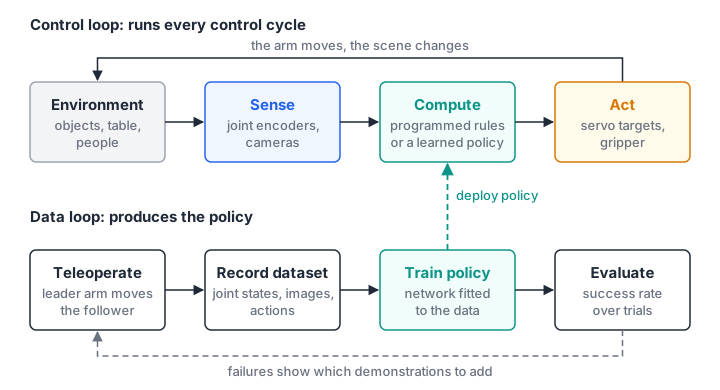
A robot is a machine that measures the world, decides what to do, and changes the world with motors, over and over. Each pass through that loop is one control cycle.
- Sense. Sensors turn physical quantities into numbers. On a robot arm the most important sensors are the joint encoders, which report each joint angle. Cameras add information about the objects around the arm.
- Compute. Software turns the measurements into commands. It may estimate where things are, plan a motion, or evaluate a learned policy.
- Act. Actuators turn the commands into motion. On a small arm these are servo motors, each with its own position controller.
The loop is closed through the environment: when the arm moves, the scene changes, and the next measurement reflects that change.
Programmed robots and learned behaviour
Industrial robots have traditionally been programmed by hand. An engineer teaches a sequence of poses, and the robot repeats them precisely. This works when the world is fixed: the same part in the same fixture every cycle. It fails when the part is rotated or the task changes, because every case must be anticipated and coded.
A learned policy replaces the hand-written rules with a function fitted to data. In imitation learning, the data are demonstrations: a person performs the task through a teleoperation device while the robot records what it saw and what it did. A neural network is then trained to map observations (camera images and joint angles) to actions (the next joint targets). The robot runs the same control loop as before; only the way the compute block is produced has changed.
This is the sense in which “data is the new code”. To change the behaviour you change the dataset: add demonstrations of the cases where the policy failed, and train again. The engineering effort moves from writing rules to designing tasks, collecting clean demonstrations and measuring success.
Learned policies still need classical robotics: frames to say where the camera is, kinematics to turn joint angles into positions, and joint controllers that track the policy’s targets. The first half of this course builds those foundations.
Embodied AI and the data budget
Embodied AI perceives and acts through a physical body: its outputs move motors, and the consequences come back through sensors. Its training data cannot be scraped from the web.
Every robot demonstration costs real time: someone resets the scene, performs the task and checks the recording, one episode at a time. A data budget is the number of demonstrations you can afford, and it shapes later decisions:
- Task scope. A narrow task (pick one cube, place it in one bin) needs fewer demonstrations than a general one.
- Variation. A policy only handles the variation it has seen. If every demonstration starts with the cube in one spot, a new spot will fail.
- Model size. Small datasets favour compact policies and pretrained vision backbones.
- Storage. Images dominate the size of a dataset (see the second exercise).
This course plans for a 50-episode pick-and-place dataset: small enough to record in one lab session, large enough to train a first policy.
Robot types, then arms
Three groups cover most robots you will read about. Manipulators (arms) are chains of links and joints fixed to a base, ending in a gripper or tool. Mobile robots are wheeled or legged platforms whose core problems are localisation, mapping and navigation. Humanoids combine arms, a torso and usually legs, and inherit the problems of both.
This course stays with arms. A fixed base removes localisation, so you can concentrate on kinematics, control, perception and learning, and the ideas carry over to the arms on mobile robots and humanoids.
Anatomy of the SO-101
The SO-101 is an open-source, 3D-printed arm from The Robot Studio and Hugging Face, the successor to the SO-100. The design files are in the SO-ARM100 repository and the setup steps in the LeRobot documentation. You use two arms: a leader that you move by hand and a follower that copies it.
Links and joints
Each arm is a serial chain: rigid links joined by revolute (rotating) joints. Starting at the base, the joints are:
| ID | Joint | Motion |
|---|---|---|
| 1 | shoulder_pan | turns the whole arm about a vertical axis |
| 2 | shoulder_lift | raises and lowers the upper arm |
| 3 | elbow_flex | bends the forearm relative to the upper arm |
| 4 | wrist_flex | tilts the wrist up and down |
| 5 | wrist_roll | rotates the gripper about its own axis |
| 6 | gripper | opens and closes the jaw (on the leader: the trigger) |
The names and IDs are the ones LeRobot uses. The forward kinematics lesson computes the gripper pose from the first five angles, using the arm’s official URDF model.
Servos on a shared bus
Every joint is driven by a Feetech STS3215 bus servo. Each servo contains a motor, a metal gearbox, a magnetic encoder that measures the absolute output angle, and a small controller that runs a position loop. Feetech specifies the encoder as a 360 degree absolute sensor with 4096 steps, about 0.088 degrees per step.
The six servos of one arm are daisy-chained with 3-pin cables and share one serial line. The bus is half-duplex: one wire carries data in both directions, so only one device talks at a time. The controller sends a packet addressed to a servo ID, and that servo answers. Each servo therefore needs a unique ID, set once and stored in its EEPROM, and all servos on a bus must use the same baud rate. LeRobot’s lerobot-setup-motors command does this one servo at a time, and its default bus rate is 1,000,000 baud. A synchronised read, in which one request makes every servo reply in turn, keeps the bus time per control cycle short.
A small controller board connects the bus to a computer over USB and powers the servos. The servos also report load, current, voltage and temperature, which helps when you look for a stalled joint.
Leader and follower
The follower arm does the work. It uses six STS3215 servos with a 1/345 gear ratio. The SO-ARM100 repository lists two follower motor versions: a 7.4 V servo and a stronger 12 V servo, which needs a 12 V supply instead of a 5 V one. The leader always uses 7.4 V servos.
The leader arm is moved by a person, so it should hold its pose but be easy to push. LeRobot’s assembly guide gives it three gear ratios: 1/345 on the shoulder lift, 1/191 on the shoulder pan and elbow, and 1/147 on the wrist flex, wrist roll and gripper. The leader also has a handle and a trigger in place of the gripper jaw.
During teleoperation the software reads the leader’s joint positions and sends them as targets to the follower, many times per second. Calibration makes this work: for each arm you move every joint to the middle of its range, then through its full range, and LeRobot records the limits. After calibration, leader and follower report the same values in the same physical pose. The LeRobot documentation notes that this is also what lets a network trained on one arm run on another.
# From the LeRobot documentation (SO-101 follower and leader). Not run here.
lerobot-teleoperate \
    --robot.type=so101_follower \
    --robot.port=/dev/tty.usbmodem58760431541 \
    --robot.id=my_awesome_follower_arm \
    --teleop.type=so101_leader \
    --teleop.port=/dev/tty.usbmodem58760431551 \
    --teleop.id=my_awesome_leader_arm
The ports are examples; lerobot-find-port tells you yours. The id names the calibration file, so use the same names every time.
From encoder counts to joint angles
The servo reports a whole number between 0 and 4095. To use it you convert counts to an angle about a calibrated mid point:
where is the raw count and is the count that calibration maps to zero. With , a reading of 3072 is . (LeRobot’s own degree conversion divides by 4095 rather than 4096; the difference is 0.02 % and does not matter here.)
Real readings are noisy. The download below models a servo held still: the ideal count plus Gaussian noise, rounded to an integer and clipped to the 12-bit range. The noise level of 2 counts is an assumed example value, not a measurement of the STS3215.
COUNTS_PER_REV: int = 4096
DEG_PER_COUNT: float = 360.0 / COUNTS_PER_REV  # 0.087890625 degrees

def counts_to_degrees(counts: NDArray | int, mid: float = 2048) -> NDArray:
    return (np.asarray(counts, dtype=float) - mid) * DEG_PER_COUNT

def simulate_reads(true_angle_deg: float, n_reads: int, noise_counts: float,
                   rng: np.random.Generator, mid: float = 2048) -> NDArray:
    ideal = np.asarray(true_angle_deg, dtype=float) / DEG_PER_COUNT + mid
    noisy = ideal + rng.normal(0.0, noise_counts, size=n_reads)
    return np.clip(np.rint(noisy), 0, 4095).astype(np.int64)
Running the full script with a fixed seed gives:
resolution: 0.0879 deg per count (4096 counts per turn)
true angle 30.00 deg -> ideal count 2389.3
first five reads: [2389, 2390, 2389, 2388, 2388]
single read:      mean  29.986 deg, std 0.167 deg
average of  4:    mean  29.986 deg, std 0.088 deg
average of 16:    mean  29.986 deg, std 0.047 deg
The mean is close to the true angle, so the noise does not bias the estimate. Averaging independent reads divides the standard deviation by about : four reads halve it, sixteen quarter it. Each extra read costs bus time and adds delay to the control loop, so a fast loop rarely averages more than a few samples.
The tests check the 12-bit constants, the angle-count round trip (within half a count), clipping, seeding, an unbiased mean and the reduction.
Downloadencoder.py
Download test_encoder.py
python encoder.py
python -m pytest -q    # 11 passed
The course workflow
Every learning lab in this course follows the data loop in the figure.
- Teleoperate. Move the leader and practise the task until your motions are smooth and consistent.
- Record a dataset.
lerobot-recordsaves each episode: joint states and actions as tables (Parquet files), and each camera stream as compressed video (MP4). A short text description of the task is stored with it. - Train a policy.
lerobot-trainfits a policy, such as ACT, to the dataset on a GPU. - Evaluate.
lerobot-rolloutruns the trained policy on the follower. You count successes over a fixed number of trials and note how each failure happened.
Evaluation feeds back into recording. If the policy fails when the cube is near the edge of the table, record more demonstrations with the cube near the edge. The imitation learning and ACT and diffusion policy lessons cover the training step in detail.
Safety from day one
The SO-101 is small, but it can pinch fingers, spill drinks and throw parts, and a learned policy can output a command nobody expected. Build these habits before the first power-on.
- Clear the workspace. Mark the area the arm can reach and keep it free of people’s hands, liquids, laptops and anything fragile. The Seeed Studio setup guide asks you to clear valuable items and people within 1 m of the arm before calibration.
- Clamp the base. An arm that is not clamped to the table can tip over when it reaches out quickly.
- Have a power cut within reach. Ctrl-C in the terminal is not an emergency stop: it depends on the software responding. Put the servo power supply on a switch you can hit without looking. When power is cut, the servos lose their holding torque and the arm can drop, so also keep the space under it clear.
- Limit speed and step size. Start with slow motions. LeRobot’s follower configuration has a
max_relative_targetsetting that caps how far any joint may move in a single command, which bounds the damage one bad output can do. - Respect the servo protections. The STS3215 has overload, overcurrent, overvoltage and overheating protection, and LeRobot limits the follower gripper to 50 % of maximum torque. A servo that drops its torque is telling you something is stuck. Find the cause before you restart.
- Disable torque when you finish. LeRobot disables servo torque when it disconnects from the follower by default. Leave that setting on.
Industrial arms follow safety standards such as ISO 10218. The deployment and safety lesson returns to them; for now, the list above is your rule set.
Read an encoder and plan the averaging
- The
wrist_flexservo reads 2731 counts. Calibration maps 2048 counts to 0 degrees. What is the joint angle? - Assume the read noise is Gaussian with a standard deviation of 2 counts. What is the standard deviation of a single read in degrees, ignoring rounding?
- How many reads must you average to bring the standard deviation below 0.05 degrees?
Show solution
- .
- . Rounding to whole counts adds a variance of count², which raises this only slightly, to .
- Averaging reads gives . Setting this below 0.05 gives , so , and you need at least 13 reads. Check with the download:
average_reads(simulate_reads(60.0, 13000, 2.0, np.random.default_rng(0)), 13).std()is about 0.05.
Estimate a data budget
You plan 50 demonstration episodes of 20 s each, recorded at 30 frames per second with two cameras at 640 × 480 pixels, 3 bytes per pixel. Each time step also stores six joint positions and six action values.
- How many time steps does the dataset hold?
- How large would the images be if stored uncompressed?
- How much robot time do the episodes take, before resets?
Show solution
- time steps.
- One image is bytes, so two cameras give 1.84 MB per step and 30,000 steps about 55 GB. The joint data (12 values per step) take 1.44 MB as 32-bit floats. This is why LeRobot stores camera streams as compressed video.
- s, about 17 minutes of motion. Resets, retries and discarded episodes take longer than that, so plan a full lab session.
Summary
- A robot runs a closed loop: sensors measure, software decides, actuators move, and the environment closes the loop.
- A learned policy replaces hand-written rules in the compute stage with a model fitted to demonstrations. Changing the behaviour means changing the data.
- Robot data costs real time, so the data budget limits task scope, variation and model choice. Images dominate the storage.
- The SO-101 is a 5-joint arm plus gripper built from six STS3215 servos with 4096-step encoders on one half-duplex serial bus. A leader arm with mixed gear ratios drives a follower arm through LeRobot.
- The course workflow is teleoperate, record, train and evaluate, with evaluation pointing at the data to add next.
- Clear the workspace, clamp the base, keep a power cut within reach and limit step size before any motion.
Check your understanding
Pick an answer for each question, then check. Answers stay hidden until you submit.
Further reading
- Paper
- Book
- Documentation
- Documentation
- Tool
- Documentation
Found a mistake or something unclear?Report a correction.
Follow this course
Get an email when new lessons and projects are added to this course.